
User guide · Chapter 3 of 4
Outline: what could we get permission for, and what is the land worth?
Figures that stand up in front of a council. Outline adds verified local policy, Section 106 and CIL, your own house types with density tiles to prove them, a full appraisal with a benchmark land value, and a comparison of land deals.
What it is for
Use Outline once a site is worth pursuing: for promotion, pre-application advice, an outline application, Section 106 heads of terms, or agreeing a land price. Your Feasibility figures carry straight across; Outline lets you replace the defaults with evidence.
Typical uses
- Pre-application discussions and an outline planning application
- Section 106 heads of terms and affordable housing negotiations
- Agreeing a land price, or choosing between selling, an option and a promotion agreement
- A housebuilder testing a site with their own house type range
What you get
- The Local Authority Policy Profile, with every figure sourced
- Section 106 and CIL, linked to the appraisal
- Full Typology & Tenure, with your own house types and density tiles
- A full appraisal with benchmark land value and sensitivity
- The land deal comparison and the Outline PDF report
The benefits
A complete Outline in a day
With the policy, cost and value information to hand, a complete Outline site takes about a day. Each policy figure is marked Verified or Default, and the report prints your source.
Contributions linked to value
Change a Section 106 contribution or the affordable housing share, and the land value and profit move with it at once.
Your own house types, proved
Load a housebuilder's range and draw a density tile for any new type, so the land it needs is shown, not assumed.
The land deal, compared
See what the landowner actually receives from a sale now, an option or a promotion agreement, and what each is worth today.
How to use it
Switch to Outline in the Start here panel. The three steps at the top work as before; the section cards now include Section 106 & CIL and Land deal.
Check the Local Authority Policy Profile
Open Site overview and click Show Local Authority Policy Profile. It lists the eleven policy figures the Model uses, such as the open space standard and the affordable housing percentage. Each is marked Default until you check it against the council's adopted policy, record your source and mark it Verified.
Why it matters: the Essex figures are illustrative defaults. The reports state how many figures you have verified, and responsibility for policy accuracy rests with the user.
Set Section 106 and CIL
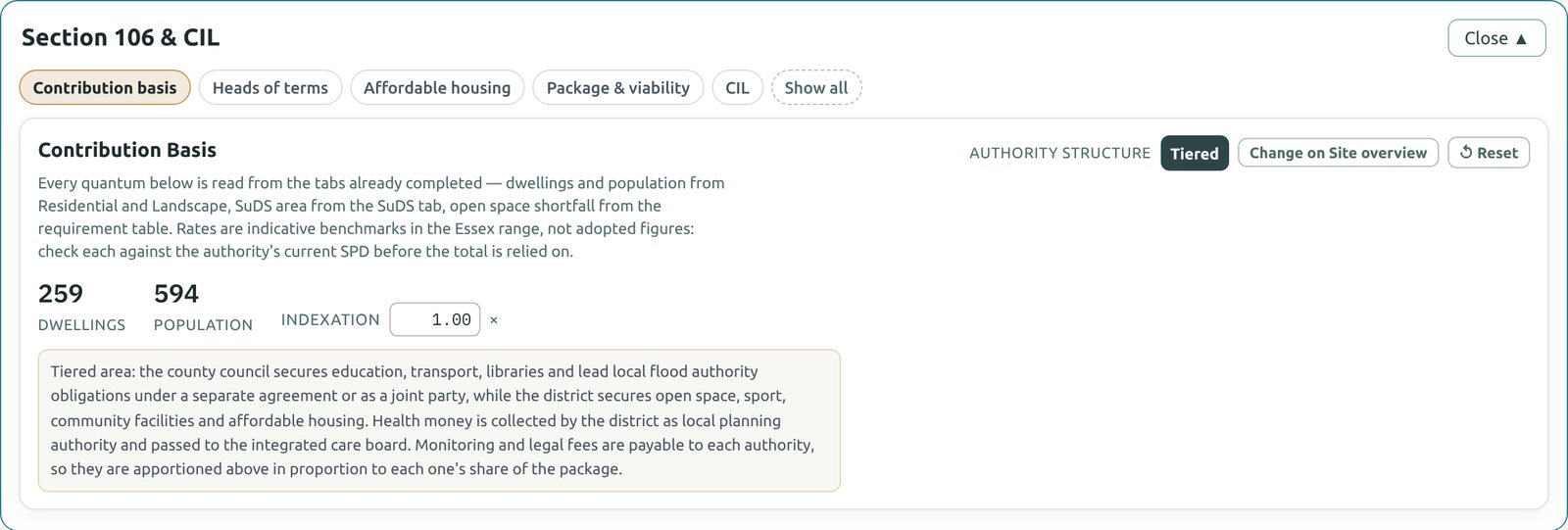
Open Section 106 & CIL. The buttons along the top take you through the Contribution basis, the Heads of terms, Affordable housing, the Package & viability and CIL. Every quantity is read from the sections already completed: dwellings, population, open space and SuDS.
The Contributions to: Unitary / Tiered switch beside the site name decides which council secures each contribution. Thurrock and Southend-on-Sea start as Unitary, the rest of Essex as Tiered.
Open Full Typology & Tenure
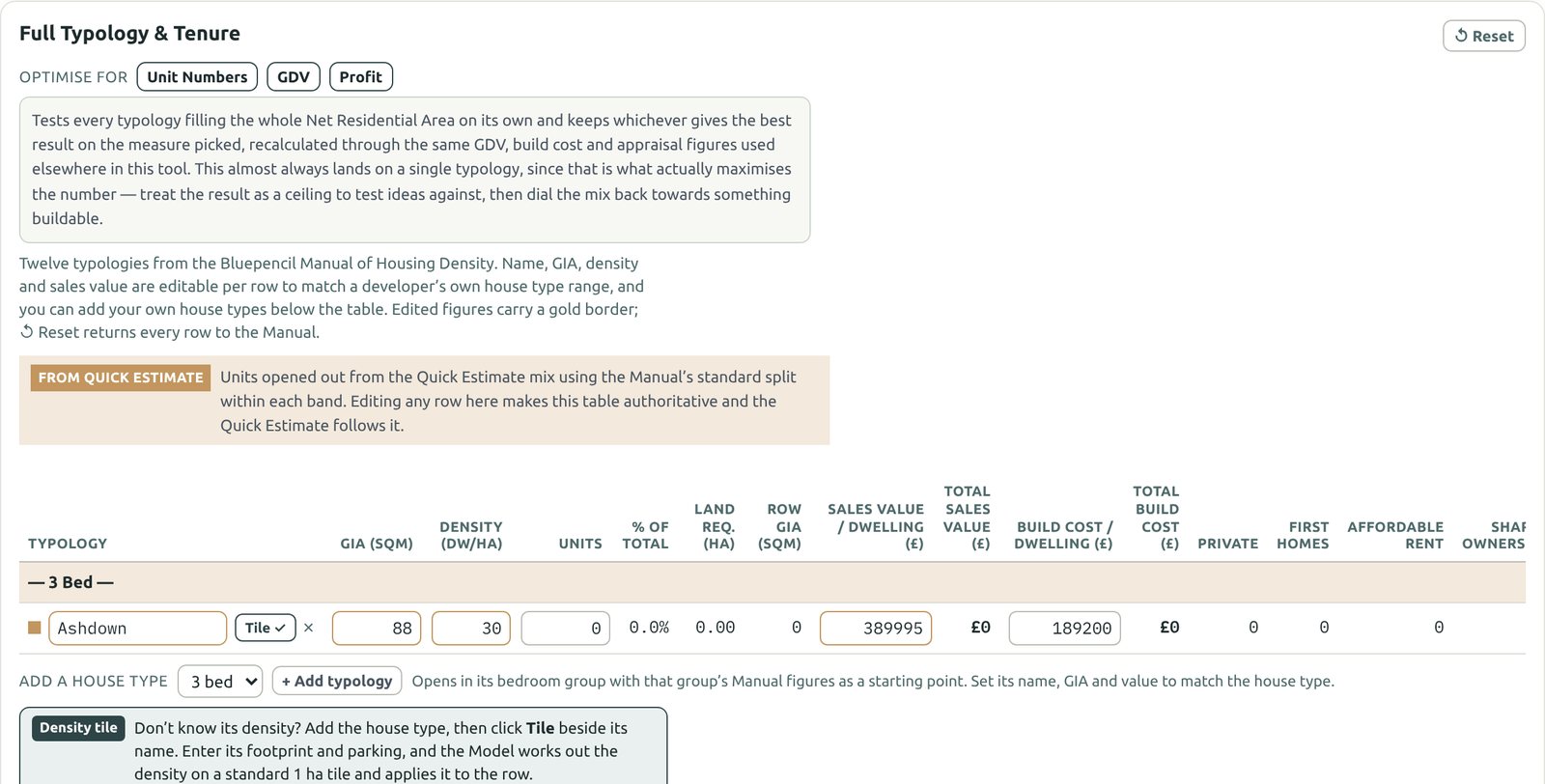
Open Housing mix and choose Full Typology & Tenure. Each house type now has its own GIA, density, units, sales value and build cost, split by tenure into private, First Homes, affordable rent and shared ownership. Totals for sales value and build cost show for every row.
Type over any figure to match your own evidence; edited figures carry a gold border. Optimise for tests which single house type gives the most homes, GDV or profit: treat it as a ceiling, then bring the mix back to something buildable.
Add your own house types
- Under the table, at Add a house type, choose the bedrooms (1 to 5 bed) and click + Add typology. The bedroom choice places the house type in its group and can't be changed later, so pick it carefully.
- The new row opens with the Manual's middle figures for that size, called "New 3 Bed Type 1". Type over its name, GIA, units, sales value and build cost.
- If you know its density, type it in. If not, draw a density tile (next step).
- To remove a house type, click the × beside its name.
Naming: use exactly the house type name on the architect's plot schedule, such as "Ashdown". The plot pricing import at Detailed Design matches plots to house types by name. Capitals don't matter; spelling and spaces do. Handed versions use the same row.
Make a density tile
A density tile shows where a house type's density comes from. The Model lays it out on a standard one-hectare tile, 100 × 100 m with 1,684 m² of roads and paths, and counts the whole homes that fit.
- Click Tile beside the new house type's name. The tile opens under the table.
- Choose the arrangement: Detached, Semi-detached or Terrace (with the number of homes in each terrace row).
- Enter the house's frontage width and depth in metres, from its plans.
- Choose the parking: tandem beside the house (2 spaces), two bays beside (4 spaces, needed for 4 and 5 bed homes), or undercroft with a room over.
- Leave the tile settings as they are unless a local standard differs: bay including M4(2) access 3.3 m, end buffer 1 m, front set-back 2 m, minimum rear garden 12 m.
- Read the plotting density and check each band says Fits. If Turned 90° offers a higher figure, click Use turned.
- Click Apply. The density goes into the table, the button changes to Tile ✓, and the land the house type needs follows.
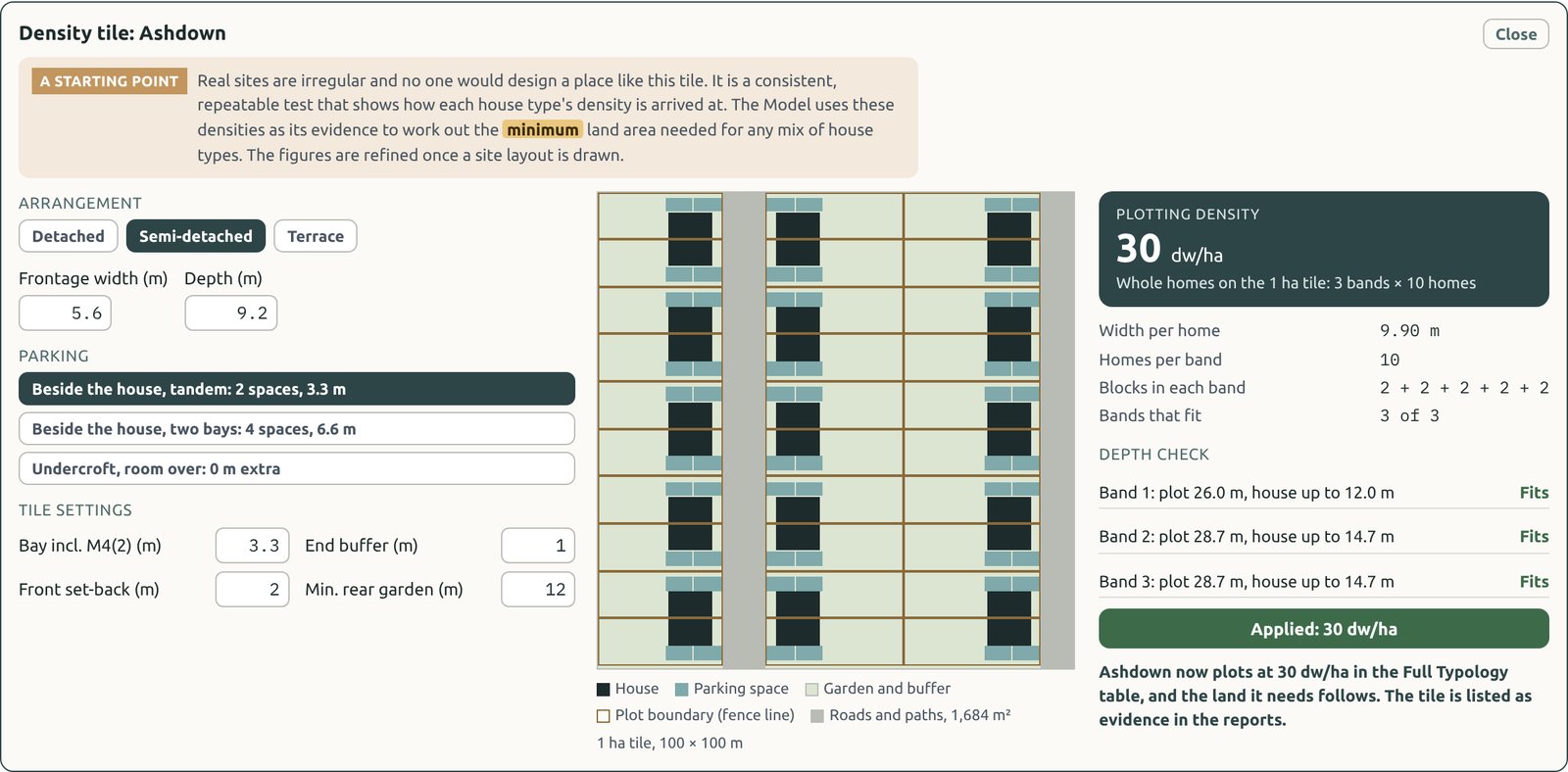
Real sites are irregular and nobody would design a place like the tile. It is a consistent, repeatable test, so house types can be compared fairly. Every applied tile is listed as Density tile evidence in the reports: the evidence for the minimum land any mix needs.
Run the full appraisal
Open Appraisal. At Outline the appraisal adds marketing, promotion and purchaser's costs, the profit target split by tenure (17.5% on private sales and 6% on affordable homes, by default), the benchmark land value and a sensitivity table.
- Benchmark land value: enter the existing use value per hectare (default £27,000) and the landowner premium (default 20%). This is the planning viability test: the least a landowner is assumed to accept.
- Sensitivity: a grid of the land value (or profit) with sales values from 10% down to 10% up and build costs from 5% down to 10% up, plus the fall in each that would break even.
Compare the land deals
Open Land deal. The same scheme is tested three ways: sell now, an option agreement and a promotion agreement. Each shows what the landowner receives, when it arrives, and what it is worth in today's money. The land value with consent comes straight from the appraisal, so any change to the scheme flows through.
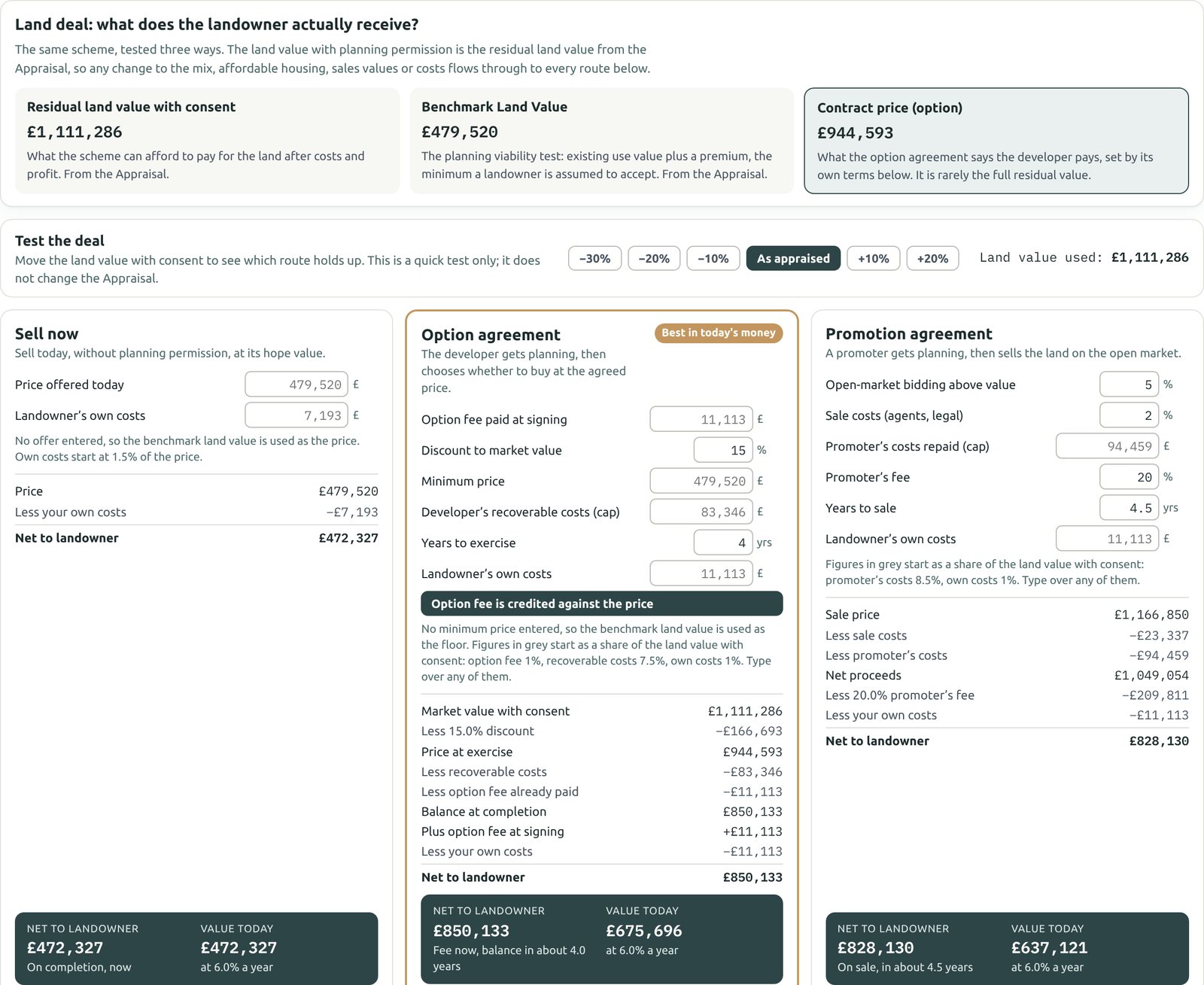
Illustrative only: it doesn't include tax, overage or every clause of a real agreement. Take advice from a land agent and a specialist property solicitor before agreeing heads of terms.
Narrow the confidence range
Outline starts at ±10% and narrows to ±7% as you evidence these steps:
- Local Authority picked
- Policy figures verified
- Sales values changed from the defaults
- Build costs priced to your own house types
- Existing use value evidenced rather than assumed
Take the Outline report
Click PDF report and choose Outline. It adds the policy profile with your sources, Section 106 and CIL, the housing mix by tenure, density tile evidence, the full appraisal with benchmark land value and sensitivity, and the land deal.
Chapter 4: Detailed Design
Measured quantities, plot pricing, open space management and the cashflow, ready for delivery.