
User guide · Chapter 4 of 4
Detailed Design: what will the scheme cost, and what will it return?
Once there is a layout, Detailed Design prices it properly: measured infrastructure and drainage, a plot-by-plot price list, the cost of looking after the open space, and a cashflow showing the money the scheme needs and when.
What it is for
Use Detailed Design when a layout has been drawn: for reserved matters, the final Section 106 negotiation, funding, and running the delivery of the scheme. Everything from Feasibility and Outline carries across; Detailed Design replaces estimates with measured quantities.
Typical uses
- Reserved matters and the final Section 106 agreement
- Pricing plots for the sales team, phase by phase
- Deciding who looks after the open space, and what it costs residents
- Funding: peak debt, interest and return for a lender or a board
What you get
- Measured infrastructure, SuDS and planting costs
- Plot Sales Pricing and a price list for each phase
- Open space management: council adoption or a management company
- Cashflow, programme and delivery triggers, with an Excel download
- The Detailed Design and Viability & Contributions reports
The benefits
A price list the same day
The architect's plot schedule becomes a phased price list in minutes, not days of typing by hand.
Upkeep costed up front
Maintenance of the open space, play and drainage is costed from the layout, so the commuted sum or the residents' yearly charge is known before it is negotiated.
The money, month by month
Peak debt, interest on the drawn balance, return and the month the scheme turns cash positive, from the figures already entered.
A complete site in one to two days
With a masterplan and the figures carried over from Outline, a complete Detailed Design site takes one to two days.
The tightest figures
Confidence of ±5%, narrowing to ±3% as quantities are measured: the figures to put in front of a funder or a council's viability adviser.
How to use it
Switch to Detailed Design in the Start here panel. Three new cards appear: Open space management, Plot pricing and Cashflow.
Measure the infrastructure and drainage
Take the quantities from the layout instead of the Model's estimates:
- In Strategic Infrastructure, enter the street lengths from the layout.
- In Appraisal, open Infrastructure, SuDS & planting and type the measured quantity for each item: roads, footpaths, drainage, basins and swales, planting and street trees.
Each measured quantity replaces an estimate, and the itemised build-up goes into the report.
Confirm the full typology and tenure mix
In Housing mix, make sure Full Typology & Tenure holds the scheme's actual house types and numbers, named as on the plot schedule. At Detailed Design, plot externals (drives, fencing, gardens and service connections) are priced in three bands by plot type rather than one blended allowance.
Price the plots
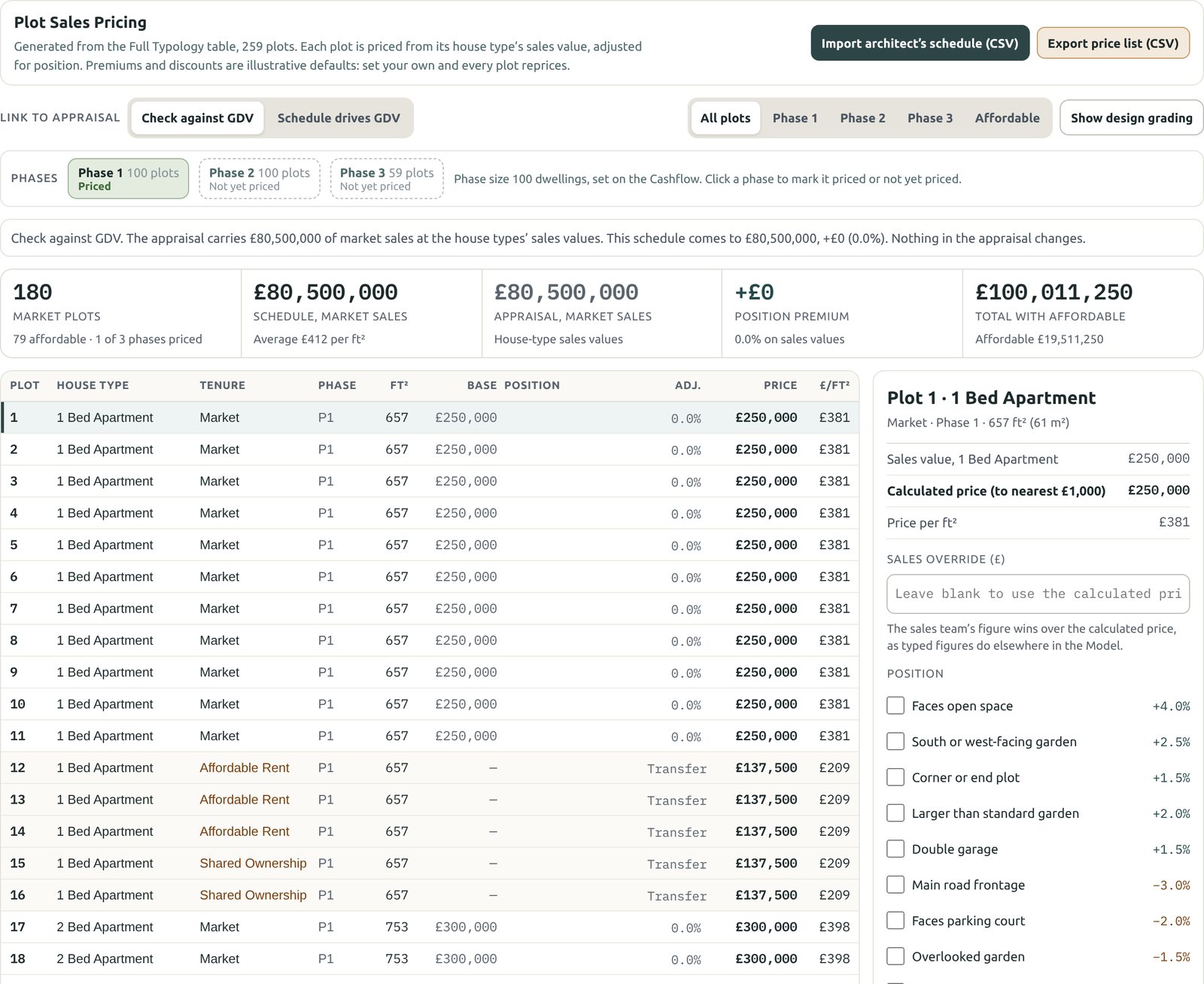
Open Plot pricing. Each plot is priced from its house type's sales value, adjusted for its position.
- Get the plots in. The Model starts with a schedule generated from the Full Typology table. To use the real layout, click Import architect's schedule (CSV): a spreadsheet saved as CSV with columns headed Plot and House type, and optionally Tenure and Phase. Any house type it can't match is listed, so you can correct the name. Use generated schedule switches back.
- Choose the phases to price. On larger schemes, prices are set phase by phase. Click a phase to mark it Priced or Not yet priced. Phase size comes from the Cashflow, or from the schedule's own Phase column.
- Mark each plot's position. Click a plot and tick what applies: faces open space, south or west-facing garden, corner plot, main road frontage, parking court and so on. Each adds or takes off a percentage. The defaults are illustrative: set your own and every plot reprices.
- Let the sales team have the last word. A Sales override on a plot wins over the calculated price. Record revision keeps a dated price history, and Show design grading scores plots on kerb appeal, layout, buildability and specification.
- Link it to the appraisal. Check against GDV compares the schedule with the appraisal and changes nothing. Schedule drives GDV puts the plot prices into GDV, profit and the cashflow.
- Take the price list. Export price list (CSV) gives the priced phases, ready for the sales team, and the report adds a price list page for each priced phase.
Cost the open space management
Open Open space management. The open space, play, sport, allotment and SuDS areas are costed for maintenance, using quantities read from the layout and published council rates indexed to today. Type over any quantity or rate, and enter a rate for SuDS basins and trees, which have no published default.
The Model then compares the two ways the land can be looked after:
- Adoption by the council: the developer pays a commuted sum once, through the Section 106. Add the commuted sum to the Section 106 costs carries it into the appraisal.
- Management company: the land stays private, and residents pay a yearly estate charge, including the managing agent's fee, a reserve fund and insurance.
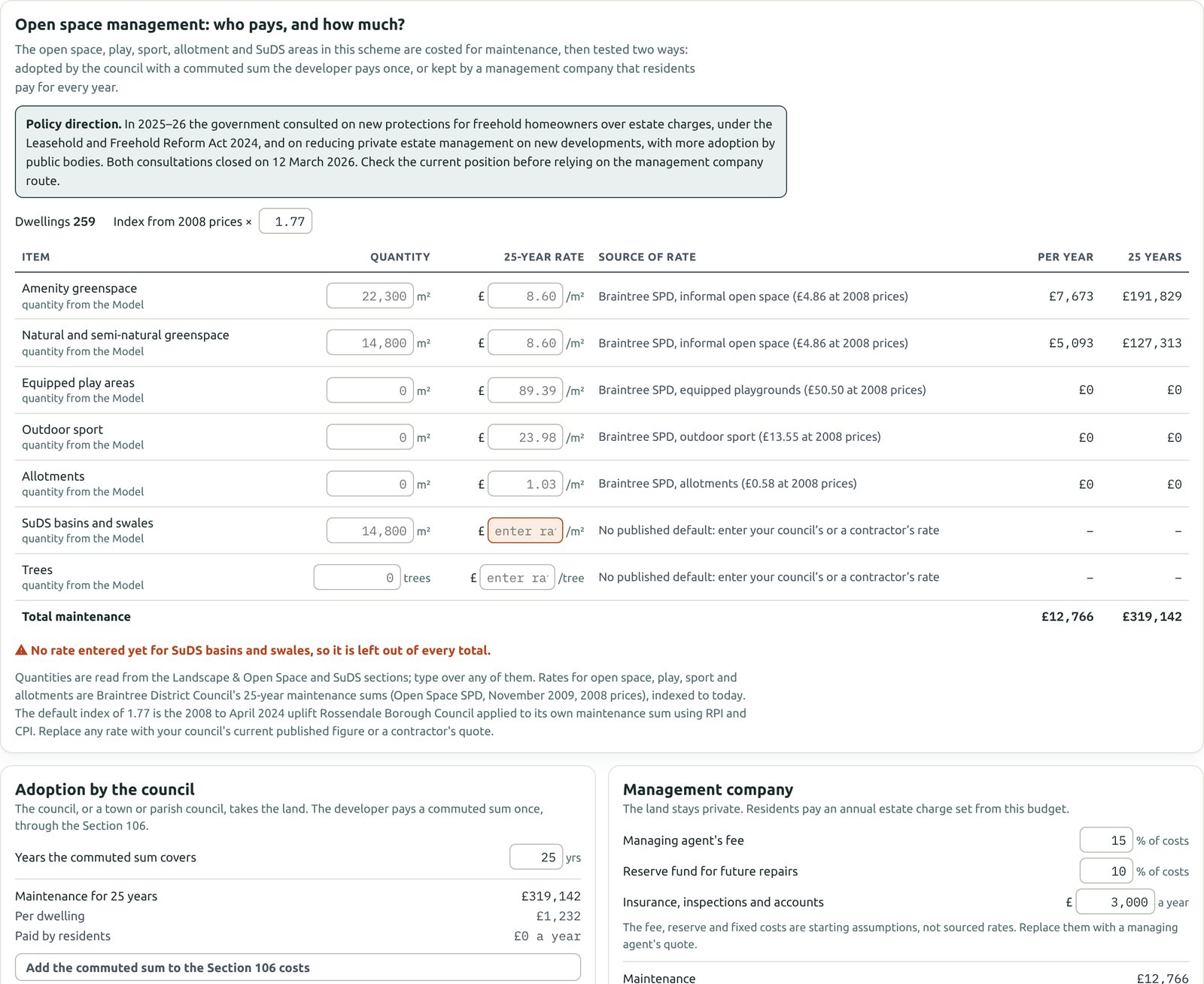
Check the policy position: the government has consulted on new protections for homeowners over estate charges. Check the current position before relying on the management company route.
Set the programme and read the cashflow
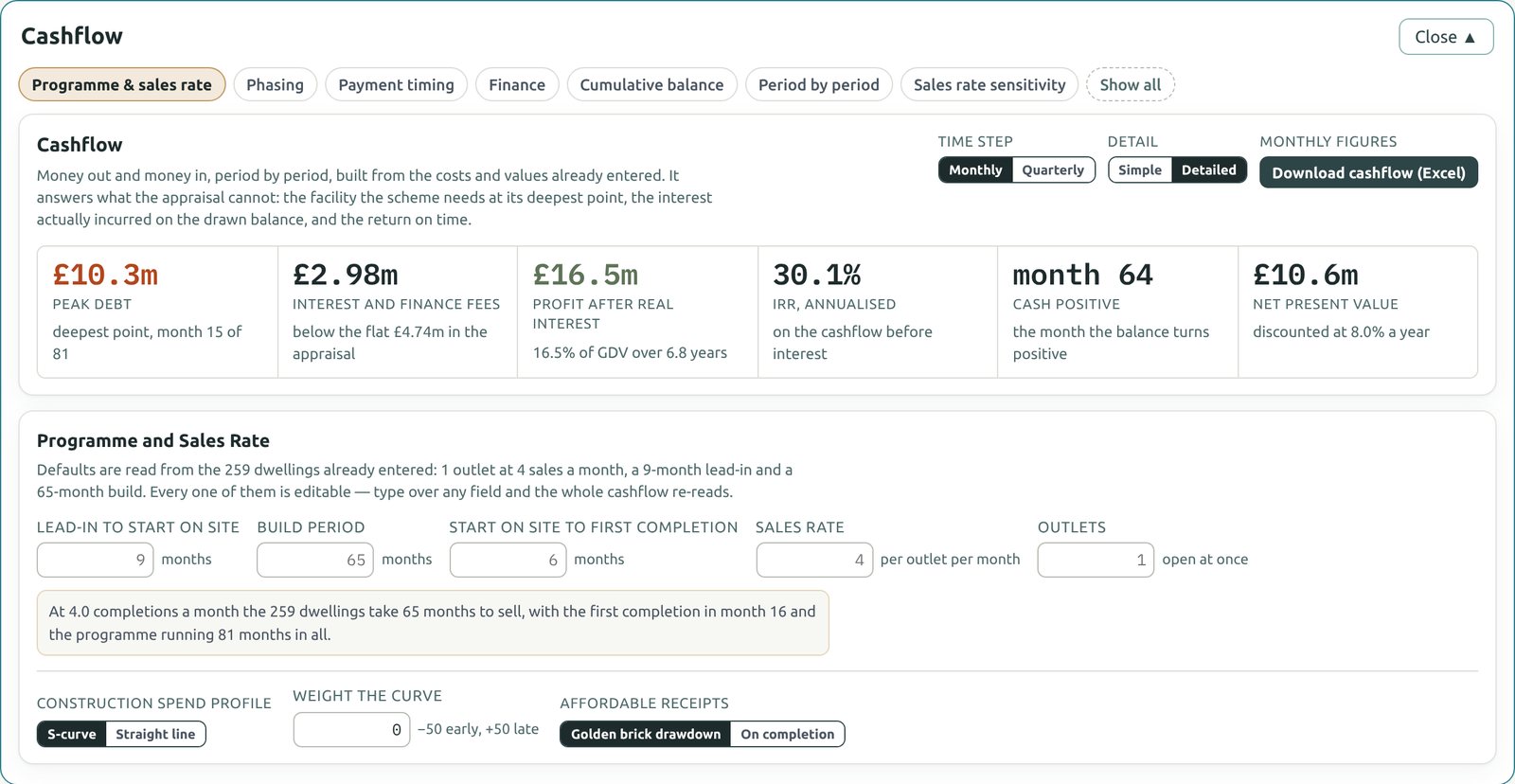
Open Cashflow. Under Programme & sales rate, set the lead-in, build period, months to first completion, sales rate and number of outlets. The Model builds the cashflow from the costs and values already entered and shows:
- Peak debt and the month it happens
- Interest and finance fees on the drawn balance, compared with the flat figure in the appraisal
- Profit after real interest, the IRR and the net present value
- The month the balance turns cash positive
The other buttons cover phasing, payment timing, finance, the cumulative balance and sales rate sensitivity. Download cashflow (Excel) gives the monthly and annual cashflow, assumptions and triggers as a workbook.
Check the delivery triggers
In Section 106 & CIL, Delivery Triggers set when each payment and obligation falls due. Most heads follow one blanket schedule; a facility residents need, such as a nursery or community hall, can be given its own trigger, set by the number of completions. Each payment is placed in the cashflow in the month it falls due, and the sales rate sensitivity shows how far a trigger moves if sales slow.
Narrow the confidence range
Detailed Design starts at ±5% and narrows to ±3% as you evidence these steps:
- Street lengths taken from the layout
- Infrastructure quantities measured, not estimated
- SuDS quantities measured, not estimated
- Full typology and tenure mix
- Programme and sales rate set
Take the reports
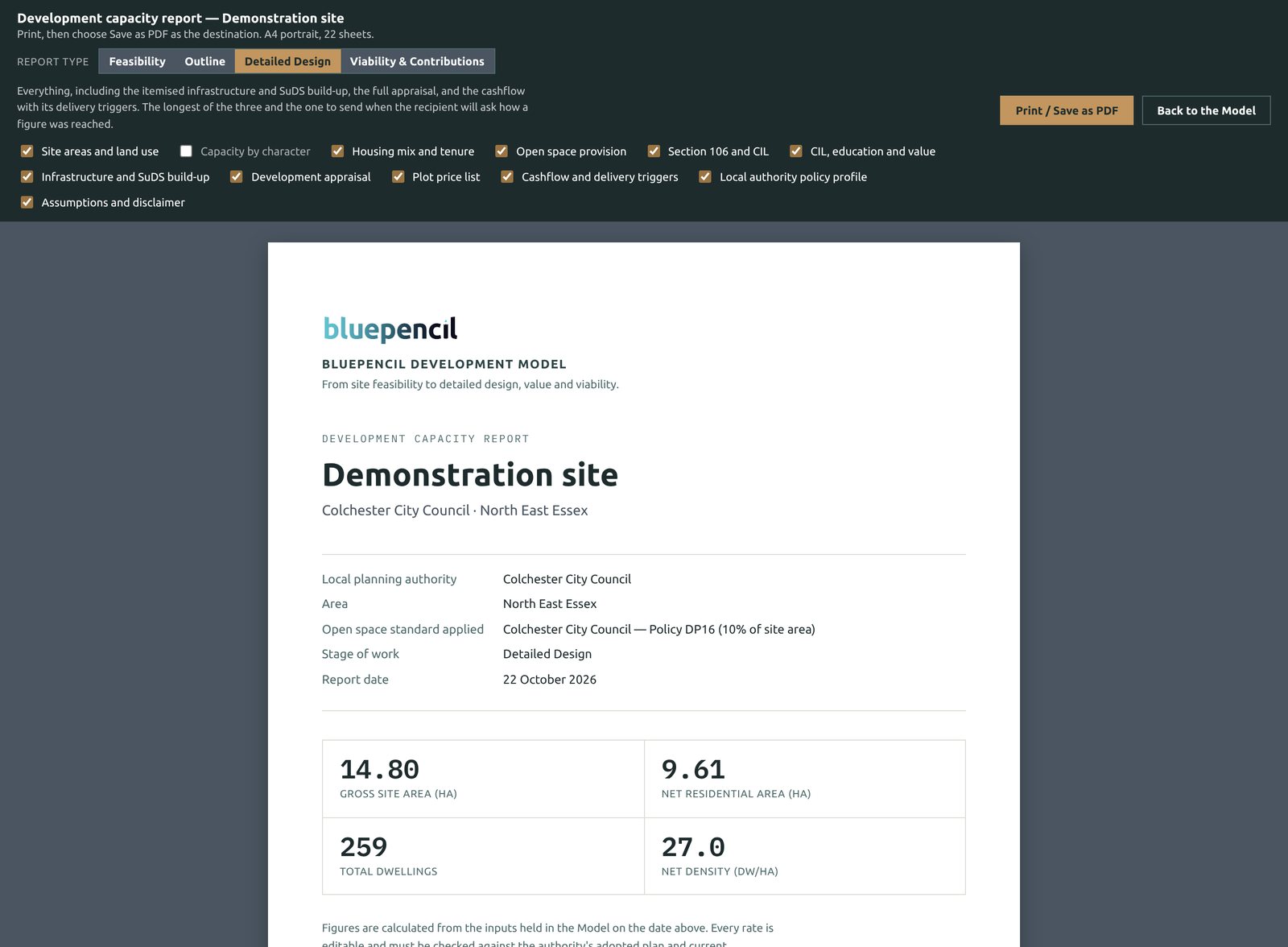
Click PDF report. Detailed Design offers every report:
- Detailed Design: everything, including the itemised infrastructure and SuDS build-up, the full appraisal, the plot price list and the cashflow with its delivery triggers. Send it when the reader will ask how a figure was reached.
- Viability & Contributions: the pack for a Section 106 negotiation with the council.
Questions about the Model?
Email [email protected] or use the contact form. We reply within two working days.